TrackMyTour
- 3.4
- Rating
- 10.00K
- Installs
- Free
- Price

 Analysis by App-foxy
I approached TrackMyTour as a travel companion for people who want to share a journey while also turning it into something they can look back on. That combination matters: many travel tools focus on directions, while social platforms focus on updates, but this app sits between personal trip documentation and shared travel storytelling. In my experience, that makes it most interesting for small groups, families, and travelers who want one place for the route and the memories around it.
The app comes from TrackMyTour and belongs to the Travel & Local category. It is free to start, with in-app purchases listed at $19.99 per item, so I would treat the free installation as an opportunity to explore the workflow before deciding whether the paid elements fit your needs. Its store summary presents it as “Travel Sharing & Books,” which gives a useful clue about its purpose: this is not just a map utility, and it is not simply a photo feed.
Using TrackMyTour as a shared travel record
I find a shared travel record most useful when it gives a journey a clear sequence, rather than asking everyone to reconstruct events from scattered messages afterward. For a practical test, I’d have one person add the main stops and invite others to contribute only the details they think will matter later. That light-touch approach keeps the record readable and makes it easier to see whether the group enjoys documenting the trip before relying on it for a longer journey.
You May Also Like

 Blood Strike: 2.5 Anniversary
Blood Strike’s Loadouts Turn Every Drop Into a Tactical Gamble
A close look at Blood Strike’s custom loadouts: how fast access to signature weapons reshapes its battle royale rhythm, rewards preparation, and narrows the gap between fights.

 Pandora - Music & Podcasts
Pandora’s Music Is Easy to Start, but Harder to Recover
Pandora’s strength is its low-effort path from a seed to a station. Its weak spot is how much confidence it asks you to place in connection, setup, and quiet recovery.

 8 Ball Pool
8 Ball Pool Is Built on Rivalries, Rematches, and Routine
A close look at the rivalries, rematches, shared routines, and unanswered safety questions that turn a quick pool match into a persistent mobile community.

 Samsung Music
Samsung Music’s Quiet Strength Is Playing What You Already Own
Its reach comes less from spectacle than from dependable access to a personal library. That simplicity is both the app’s strongest retention engine and its ceiling.

 AccuWeather: Weather Radar
AccuWeather Review: A Quick, Clear Forecast for Everyday Decisions
For everyday plans, the best forecast is the one you can understand quickly. AccuWeather makes rain timing, radar, and local conditions easy to act on, with a few trade-offs.

 Hill Climb Racing
Why Hill Climb Racing Still Turns Crashes Into One More Run
A tiny car, a bumpy hill and one more upgrade: Hill Climb Racing keeps resurfacing because its simple chaos makes every near-miss feel personal.
More From Our News Desk
View All News


Readability and navigation during a trip
The first thing I look for in a travel app is whether I can understand what is happening without stopping to study the screen. Travel already creates enough distractions: unfamiliar streets, changing plans, poor reception, tired passengers, and people asking for the next stop. TrackMyTour makes the most sense when treated as a visual record of a trip rather than as a replacement for every navigation tool.
That distinction is important for expectations. If I need turn-by-turn driving guidance, a dedicated navigation app is usually the safer primary choice. If I want to show companions where the group has been, add context to a journey, and build a record that feels more personal than a sequence of map pins, this app has a clearer reason to exist.
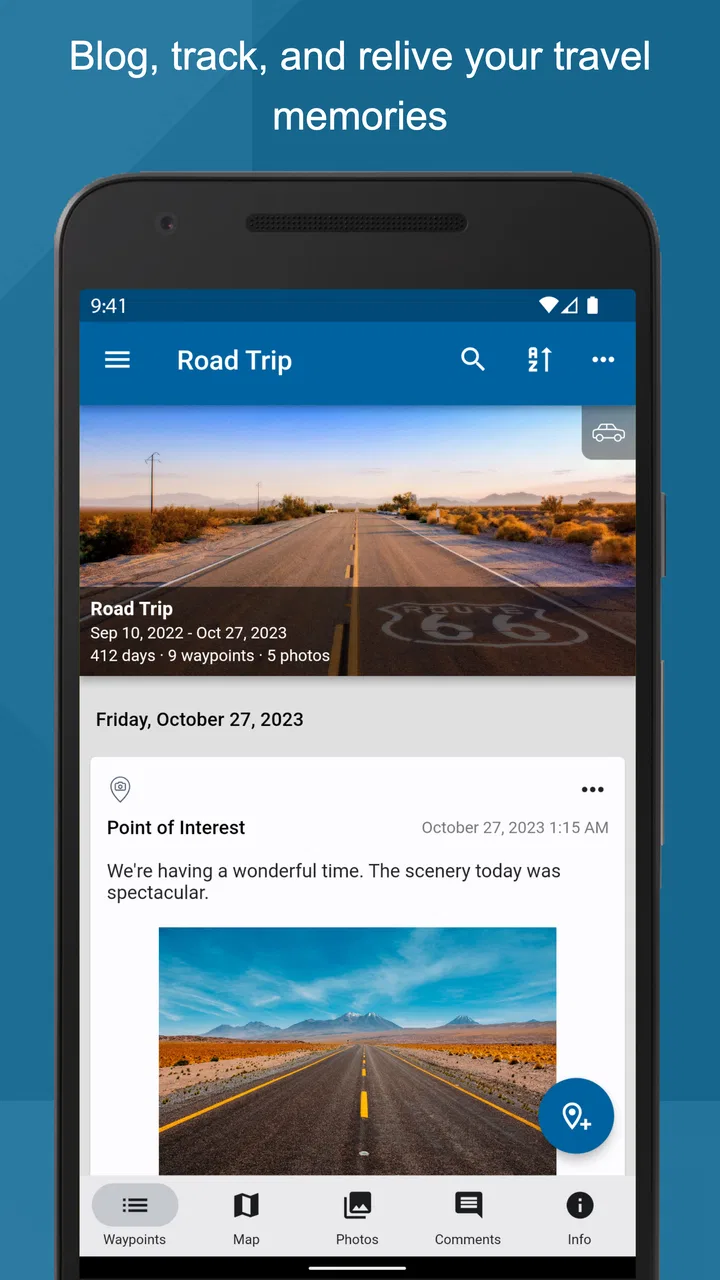
I found the travel-book idea particularly useful for longer journeys. Instead of relying on scattered messages, separate photo albums, and notes stored in different places, I can think through the trip as a sequence. That helps when the audience includes people who were not present. A relative following a holiday, for example, may care less about exact route precision than about understanding the order of places visited and the story connecting them.
For readability, the practical habit is to prepare important information before moving. I would not try to compose a detailed entry while walking through a crowded station or crossing a busy street. A short update made from a stable position is easier to review and less likely to become an accidental, confusing record. The app works better when the traveler separates capturing a moment from navigating the next one.
There is also a useful difference between reading a trip afterward and checking it live. During the journey, short entries and clear location context are more valuable than polished writing. Afterward, the same material can become a more complete travel book. That two-stage workflow is one of the strongest ways to get value from the product: capture quickly first, then organize or expand when attention is available.
People with different reading speeds may appreciate that the app’s purpose does not require every update to be long. A concise location note can communicate more effectively than a dense paragraph, especially on a small phone screen. I recommend deciding on a simple pattern before a trip, such as place, activity, and one memorable detail. Consistency makes a shared tour easier for others to scan.
Motor and sensory considerations
Travel apps can be demanding for users with limited dexterity, hand tremors, fatigue, or difficulty making precise selections. TrackMyTour is not something I would operate continuously while moving. The safest and most comfortable approach is to stop, support the phone, and complete one task at a time. That is good travel practice for everyone, but it becomes especially important when repeated tapping or quick gestures are tiring.
Users who find small interface elements difficult should plan their contributions in advance. A prepared sentence, a saved note outside the app, or a short list of intended stops can reduce the amount of typing needed in the moment. I also prefer using the app during natural pauses: at a café, on a train, in a hotel room, or after arriving at a viewpoint. This turns the app into a low-pressure journal instead of another demand on attention.
For travelers who are sensitive to visual clutter, the app’s value depends on keeping each shared entry focused. A trip can become difficult to follow when every moment is recorded with excessive text or repeated updates. I would encourage a group to agree on a rhythm: one person can maintain the main record, while others send occasional highlights. That arrangement reduces duplicate work and makes the final story easier to read.
People with hearing-related access needs should not assume that every important part of a shared journey will be available in the same form. The most inclusive group workflow is to write essential information rather than relying on spoken explanations outside the app. Meeting points, changes in plans, and practical instructions should be written clearly in the shared record or in the group’s agreed communication channel.
Similarly, travelers with low vision may need to combine the app with the phone’s own display and text settings, as well as with personal assistive tools. I would test the complete workflow before departure rather than discovering during a busy trip that reading, selecting, or entering information is uncomfortable. The key question is not only whether the app opens, but whether a person can independently complete the actions they need without rushing.
Situational access: where the app helps and where it becomes difficult
TrackMyTour is most convincing in situations where the trip itself is the shared subject. A family on a road journey can use it as a running memory for relatives at home. Friends traveling separately can use a common record to compare their routes. A solo traveler can use it as a personal archive that is more structured than a camera roll. In each case, the benefit comes from connecting places with a narrative.
Consider a realistic weekend scenario. I might leave home early, visit several towns, and meet friends at different points along the way. Rather than sending a separate message after every stop, I could add a brief update when I arrive, include the relevant context, and let the shared tour build over time. At the end of the day, the group has something more coherent than a chat thread full of photos, while I still avoid writing a full diary during the journey.
The app can also suit travelers who want to share selectively. A public social feed encourages broadcasting every detail, whereas a travel record can be kept within a smaller circle, depending on how the user chooses to share it. I would still be careful with sensitive information. Live travel updates can reveal that a home is empty or identify a person’s current location, so I would avoid posting exact timing or private details unless the audience is trusted.
Situational access changes dramatically with connectivity, battery level, weather, and crowding. I would not make the app the only copy of essential reservations, addresses, emergency information, or directions. A screenshot, written note, or separate offline reference is sensible preparation. That is not a criticism unique to this product; it is a basic rule for any travel service that depends on a phone being usable at the right moment.
It is also worth considering the role of the group. If one person enjoys documenting everything and the others do not, the app can become a useful personal project but a poor shared system. Before a trip, I would agree on who is responsible for updates, who can contribute, and whether the goal is live sharing or a finished record afterward. Clear expectations prevent the common problem of a shared travel tool becoming one person’s unpaid administrative task.
How it compares with familiar alternatives
The usual alternative is a messaging app. Messages are fast, familiar, and good for urgent coordination, but they often bury earlier updates and make a long trip difficult to reconstruct. TrackMyTour has a stronger case when the goal is an ordered travel story rather than immediate conversation. For quick changes such as “meet at the entrance,” I would still use the group’s normal messaging method.
A photo gallery is better for preserving images, especially when the main purpose is visual storage. It is less helpful when I want the route and the sequence of experiences to remain understandable. TrackMyTour’s travel-book angle makes it more suitable for explaining how the journey unfolded, while a gallery remains the better archive for a large collection of photographs.
Dedicated map and navigation tools remain preferable for precise route planning and active guidance. They are designed around getting from one point to another, not necessarily around creating a readable account for other people. I see TrackMyTour as complementary rather than competitive in that situation: navigation gets me there, while the tour record explains what the journey meant.
A traditional notes app offers maximum flexibility and can work offline, but it usually requires more manual organization. I would choose notes when I want a private diary, a packing list, or a detailed plan with no sharing component. I would choose TrackMyTour when the location-based travel record and the ability to share the experience are central.
Remaining barriers and practical compromises
The main barrier is that the app asks users to manage both travel and documentation. That can be enjoyable for an organized traveler, but it may feel like extra work for someone who wants to be present and forget about their phone. The more elaborate the record becomes, the more time and attention it demands. I would begin with a small test trip rather than committing to documenting an entire holiday.
The free entry point is helpful, but the presence of $19.99 in-app purchases means I would pay attention before assuming every desired part of the experience is included without charge. My advice is to explore the basic workflow, identify which function matters most, and only then consider a purchase. This is particularly important for families or groups, where several people may need access to the same travel record.
The mature age classification also deserves attention when a trip includes children or mixed-age audiences. I would not treat the app’s travel purpose as a guarantee that every shared entry is suitable for younger readers. Adults should decide how the service fits the group, review what is being shared, and avoid assuming that a travel book is automatically appropriate for every participant.
Adoption is another practical consideration. With an average rating of 3.4 from around thirty ratings and over ten thousand installs, the app has a modest public footprint rather than the broad familiarity of the biggest travel platforms. That does not decide its quality for me, but it does mean I would test it before making it central to an important trip. A small audience can also be a benefit for someone who prefers a focused tool over a crowded social network.
The current version is 6.3.3, and the app runs on Android 8.0 or later. That makes device compatibility part of the decision: anyone using an older phone should check the requirement before planning around it. I would also update and test the app at home, then confirm that the people who need to view or contribute can do so comfortably before departure.
Who should use it, and who should choose something else?
I would recommend TrackMyTour to travelers who enjoy documenting places, families who want relatives to follow a journey, and small groups looking for something more organized than a chat thread. It is also a good fit for someone who wants a travel book to emerge from simple updates instead of writing a polished diary from scratch.
I would be more cautious about recommending it to users who need guaranteed offline navigation, highly precise driving guidance, or a completely private note-taking space. Those needs point toward a navigation tool or a dedicated notes app. It may also be the wrong choice for travelers who find phone-based documentation distracting or physically tiring. In that case, taking photographs and writing a short account later could be a more comfortable and inclusive workflow.
For accessibility, I see the app as workable when the user controls the pace and prepares around personal needs, but I would not describe it as universally effortless. The best experience comes from short entries, deliberate pauses, written coordination, and a backup for vital travel information. Those choices help users with different abilities, and they also make the app less stressful for anyone dealing with crowds, fatigue, limited battery, or an unfamiliar environment.
My inclusive verdict is cautiously positive. TrackMyTour offers a distinctive way to connect location sharing with a lasting travel narrative, and I like that it can serve both the people on the trip and those following from elsewhere. Its strongest use is not replacing every travel app; it is giving a journey a readable shape. I would try the free version on a low-stakes outing, establish a simple contribution routine, and keep navigation and essential documents separate. If that workflow feels comfortable, the app can become a thoughtful shared record rather than another source of travel friction.
FAQs for TrackMyTour
01What is TrackMyTour and what can I use it for?
TrackMyTour is a travel-tracking app designed to help you record and share journeys, tours, road trips, hikes, and other adventures. After creating a tour, you can add locations, photos, notes, and updates to build a travel diary. Depending on your sharing settings, friends, family, or other participants can follow your progress while you are traveling.
02Does TrackMyTour require an internet connection or GPS?
TrackMyTour generally relies on your device’s location services to record where you are, so GPS access should be enabled for the best experience. An internet connection may be needed to synchronize locations, upload photos, and share updates. Coverage can affect how quickly information appears, and continuous location tracking may use additional battery, especially during long trips.
03Can I share my tour with friends and family?
Yes, sharing is one of TrackMyTour’s main purposes. You can typically provide other people with access to a tour so they can view your route, locations, photos, and written updates. Before sharing, review the tour’s privacy options carefully, because location history and travel details may reveal where you are or where you have been.
04Is TrackMyTour suitable for hiking, cycling, and road trips?
TrackMyTour can be useful for many types of travel, including sightseeing, hiking, cycling, backpacking, and road trips. It works best when you want to document a journey rather than use a dedicated navigation system. For outdoor activities, remember that GPS accuracy can vary near buildings, mountains, dense trees, or in poor weather, and the app should not replace proper maps or safety equipment.
05Does TrackMyTour cost money, and what should I check before downloading it?
TrackMyTour’s availability, pricing, and included features can vary depending on the platform and the current app version. Before downloading, check the official Google Play or App Store listing for subscription details, in-app purchases, supported devices, required permissions, and the latest update date. Also review the privacy information, particularly how location data, photos, and account information are collected and shared.
Pros
- Live location sharing helps groups stay coordinated during tours.
- Trip members can follow the route without repeatedly asking for directions.
- Useful for documenting visited places and creating a travel diary.
- Can improve safety by letting trusted contacts monitor your progress.
- Designed around tours
- making travel updates more organized than chat apps.
Cons
- Location tracking may drain battery during long sightseeing days.
- Some features may depend on reliable mobile data or GPS reception.
- Sharing location raises privacy concerns for cautious travelers.
- The app may be less useful for solo trips or short local outings.
- Users may need time to learn the tracking and tour-management tools.

TrackMyTour
Gallery